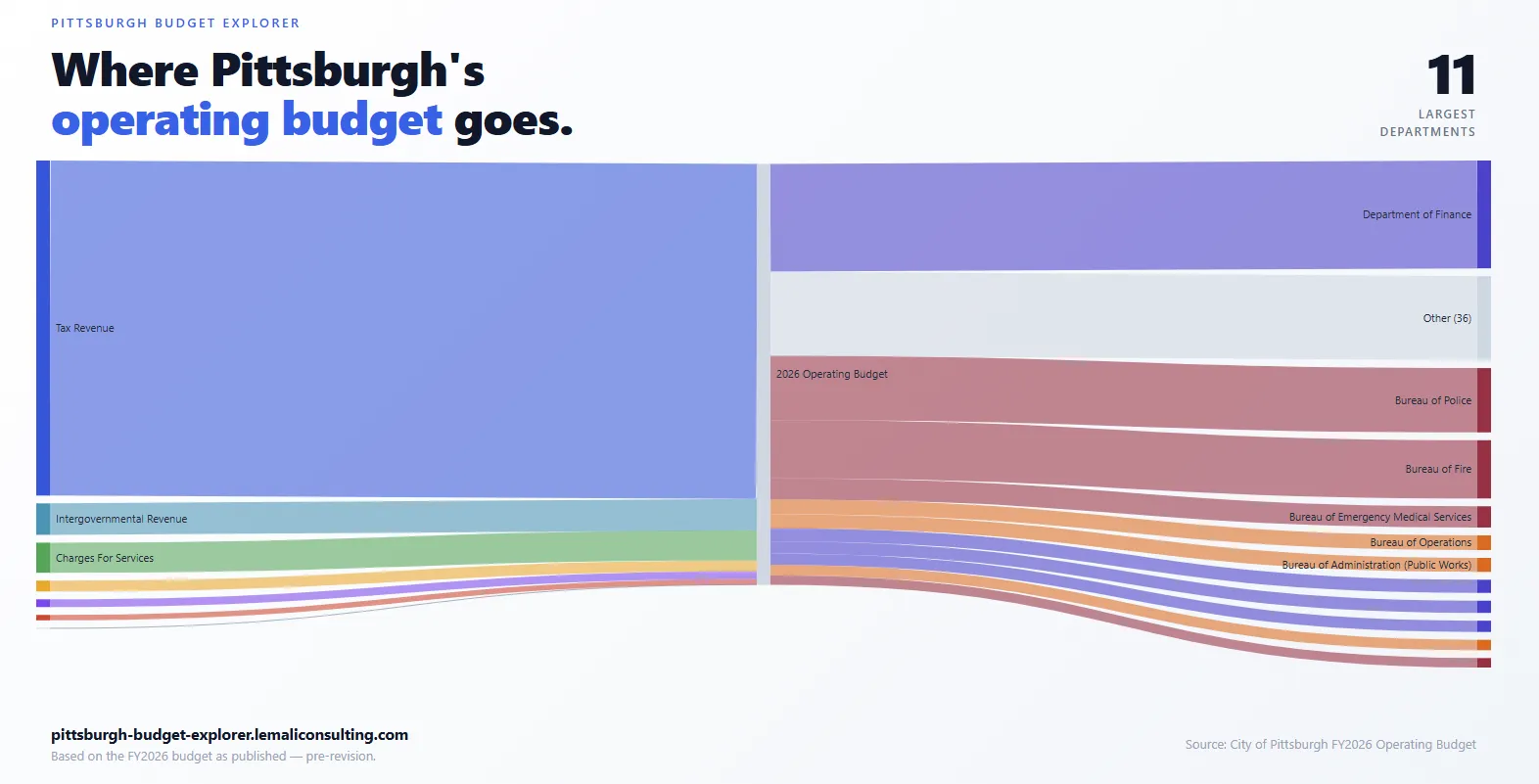
Recently, I began showing off my Pittsburgh Budget Explorer, a web app presenting information about the 2026 Pittsburgh Budget in an accessible, searchable, and visual manner.
This comes with a number of caveats:
- This was the original 2026 Pittsburgh Budget. Since then, the new mayoral administration has overseen modifications to the 2026 budget. That revised budget, however, has not yet been published as a PDF.
- Any scraping done on documents this large and diverse runs the risk of having inaccuracies. I leveraged spot checking and automated checking to catch and correct discrepancies, but there is always the risk of errors slipping through.
With all that said, I’m quite happy with how it turned out, and eager to think of how it can be made more useful to folks.
In this post, I want to talk about how I built it — what the main problem was, how I used AI to help build it (and how I worked to prevent common AI pitfalls), and what solutions like this mean for civic transparency.
Context
The city of Pittsburgh publishes its capital and operational budget for the year as two PDFs, which are collectively over 500 pages. Like any city budget, it dives into what revenue streams the city has and where expenditures are apportioned, from the level of whole departments and grants down to specific line items such as individual staff.
All of which makes the budget accessible at a baseline. But there are a few ways that accessibility could be improved.
- Many terms and acronyms are either not described within the budget itself (Community Development Block Grant, or CDBG), or are described only in one location that readers may miss (PAYGO).
- Searchability is limited. A user can search for text matching, but this often requires users to search through many instances of a text before they find what they’re looking for. A term like “Police”, for example shows up 158 times.
- There are limited visualizations. Many of the tables and aggregate overviews could be more substantively illustrated by graphs, but there are far fewer graphs than there could be.
All of these could be done without requiring additional data — they’re present within the PDFs. But they require or benefit from a more interactive format where users can control the level of detail they want to drill down into a specific area.
Solution and Challenges
With that in mind, I decided to use the budget to build an interactive website, where users could search, drill down into details with helpful visualizations, and have glossary entries and other components to aid accessibility.
In this case, though, the main challenge wasn’t building the website, but extracting the data from the PDFs.
PDFs are designed to be published once and viewed many times, and there is a lot of support for exporting and reading them. They’re one of the closest things we have to a common format.
But PDFs are designed to be read by humans, not machines. Computers like to read things in a clear, linear sequence, and PDFs don’t always follow that. A table on a PDF can be coded in one of several different ways, while still appearing the same visually. A lot of software struggles with that.
The Pittsburgh budget PDFs have this issue — different sections format their tables differently, each requiring different parsing approaches. Even if a human being can read all of them, slight variations in how the tables are formatted — one using whitespace to differentiate between columns, and the other using black borders — are much more complex for programs to parse. Especially in the case of whitespace, a PDF extractor cannot easily distinguish between what’s an intentional space to demarcate columns, and what is an incidental space between words.
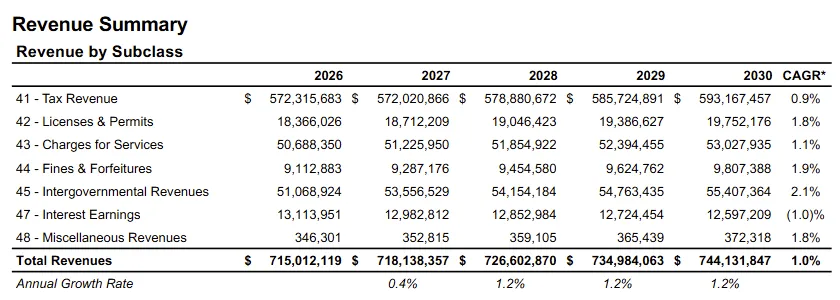
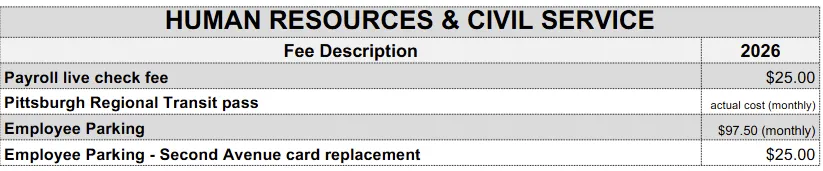
This is a process that would take days to do right, and with a high margin for manual error; it is difficult for a single human being to meticulously inspect 500 pages once, much less multiple times. Fatigue sets in, and the repetition of the data makes it tempting to pass over areas that seem fine, which is normally where errors show up.
How I solved it
As recently as a few years ago, if someone didn’t want to pull all of the data by hand, the only solution to this was a tedious process of tweaking PDF parsers until you were reliably pulling the data from the PDF correctly.
With the advent of sophisticated AI such as Claude or ChatGPT, you now have a few more levers. In some cases, you can pipe the PDFs into what is called Optical Character Recognition (OCR) software, which interprets text much like how a person reads.
Nowadays, there is technology that enables doing this relatively easily, but high-quality OCR costs money — fractions of a cent per page, but that adds up with a 500 page document, especially if the OCR process makes mistakes and you have to repeat it. OCR is also harder to audit; OCR relies on machine learning, which involves a model trained on so much data, with so many deep connections, that no human being can diagnose precisely why a specific error occurred. And OCR doesn’t always solve the problem of table formatting — it may just present the text as paragraphs, which will break tables.
The alternative I chose was to build a PDF parser, but leverage AI coding agents (specifically, Claude Code) to help build it. More than that, I then used that same AI to verify the output of the parser against the source PDF, using that to identify errors which I provided back to the AI to correct the parser. Each time I corrected the parser, I repeated the validation process. After a few rounds of this, I then did manual spot checking once I was reasonably confident that the most obvious issues were ironed out.
There are a few common pitfalls when it comes to agentic coding in a situation like this. I took note of them, and built appropriate guardrails.
The first is hallucination: AI inventing numbers that aren’t in the source. Building a parser instead of using OCR was the main defense here; every output traced back to a rule in the code, rather than something the model produced from its own reading of the page.
The second is plausible-but-wrong output: a parsed table that looks reasonable but misaligns columns by one row. Having the AI compare parser output to the source PDF caught cases I would have skimmed past myself, especially across hundreds of similar-looking tables.
The third is drift: a fix for one section silently breaking another I’d already validated. The guardrail was re-running validation across the whole budget after every fix, not just the section I’d just touched.
Using AI to build the parser and validate its output took away a lot of the tedium of writing and checking intermediate results. I still had to check the results myself in the end, but I had to do much less manual checking than I would have otherwise.
Once I did that, it was easier (relatively speaking) to build the web app from the source data.
What does this mean?
Generative AI has a lot to offer civic transparency. Scraping large and complex PDFs like the Pittsburgh budget used to be a highly brittle and labor-intensive task, requiring a lot of minor tweaks and inspections to get something close to acceptable. AI agents accelerate that process massively, and AI is very good at handling the grunt work of minor tweaks, especially when it’s able to validate the output as it goes.
At the same time, governments can also help make their data more accessible by presenting it in more machine-readable formats, such as Excel or CSV or as APIs. That considerably simplifies the demand on scraping systems, and reduces the risk of inaccuracy in translating the data from one format to another.
This doesn’t mean that humans are obsolete; quite the contrary. You still need humans to validate the outputs, design the scraping systems, and direct them in the proper direction. The difference is that now, this sort of work is able to be done at scale, whereas previously it was all but impossible.
← All posts
